
Your Company Email Migration Will (Probably) Go Fine. Here Is Why.
Someone brought up switching email providers. Maybe it was a cost conversation, maybe a privacy concern, maybe the third time this month something broke. And immediately the room filled with questions and worries.
What happens to the history? Will mail stop working? What if something unexpected comes up?
Those are fair questions. The answers are less scary than they feel in that meeting.

What People Are Actually Afraid Of
Ask anyone who has delayed an email migration what they are worried about and the answers are consistent:
Mail stops working.
Clients cannot reach us. Orders get missed. Someone important sends something and it gets lost.
History disappears.
Years of correspondence, contracts, threads with context that exists nowhere else.
The unknown will cost more.
A migration sounds straightforward until something unexpected adds days and an invoice nobody budgeted for.
These are real concerns. But email migration is actually one of the more straightforward IT changes a company can make. The fears around it tend to be larger than the actual work.
Thinking about moving your company email? Grace Mail Managed includes migration as part of the service. We plan the cutover, copy the mailboxes, validate DNS, and keep rollback available until you are confident everything works.
The Main Peace of Mind
A proper migration copies your email. It does not move it.
Your current messages stay exactly where they are throughout the entire process. The new server receives a copy of the history. Nothing is deleted from the old system until everything on the new one has been confirmed to work, with real tests, not assumptions.
If something feels wrong at any point before the final switch, nothing is lost. The old provider is still running, still receiving mail, still fully intact.
What a Properly Run Migration Looks Like
It starts before anyone changes anything. The new solution is set up and tested in isolation, confirmed to send and receive correctly. Spam filtering is checked. Deliverability to major providers is validated with actual test sends. This happens quietly, in the background, while your company operates normally.
The next step is inventory. Every mailbox, its size, its aliases, who has access, which domains it covers. This is where most surprises surface, and it is far better to find them here than during cutover. A good inventory also tends to reveal mailboxes that no longer need to exist, which is a useful cleanup opportunity.
With the inventory done, the new environment is prepared in full. Mailboxes created, domains configured, settings in place. Everything ready, nothing switched yet.
Then the copy runs overnight. Every message from every mailbox is transferred to the new server. Your team notices nothing. Mail still arrives on the old system. The next morning, the history is on the new server, and the old system is unchanged.
The cutover itself is a DNS change. It is the moment new incoming mail starts arriving on the new server instead of the old one. For companies with up to around twenty mailboxes, the remaining work, updating email clients on computers and phones, can typically be completed in a few hours. For larger teams, a staged approach is possible where old and new run in parallel, with forwarding keeping everyone reachable throughout.
After cutover, the transfer continues running for a short period to catch anything that arrived in transit. Once send and receive is confirmed across the team, the old system is stood down. Not before.
DNS and email are deterministic systems. Handled this way, there is no grey area and no moment where mail simply disappears.
Not sure where to start? We help companies plan and execute this process. Get in touch and we will walk through your specific situation.
What to Look For
Whether you move to Grace Mail, another provider, or manage it internally, a properly run migration should include:
- A copy-first approach with rollback available until cutover is confirmed
- DNS and deliverability validation before anything switches
- Real send and receive testing, not just a green dashboard
- A clear plan for updating client settings across the team
- A named person responsible if something needs attention
If any of those are absent or vague, the plan is not finished yet.
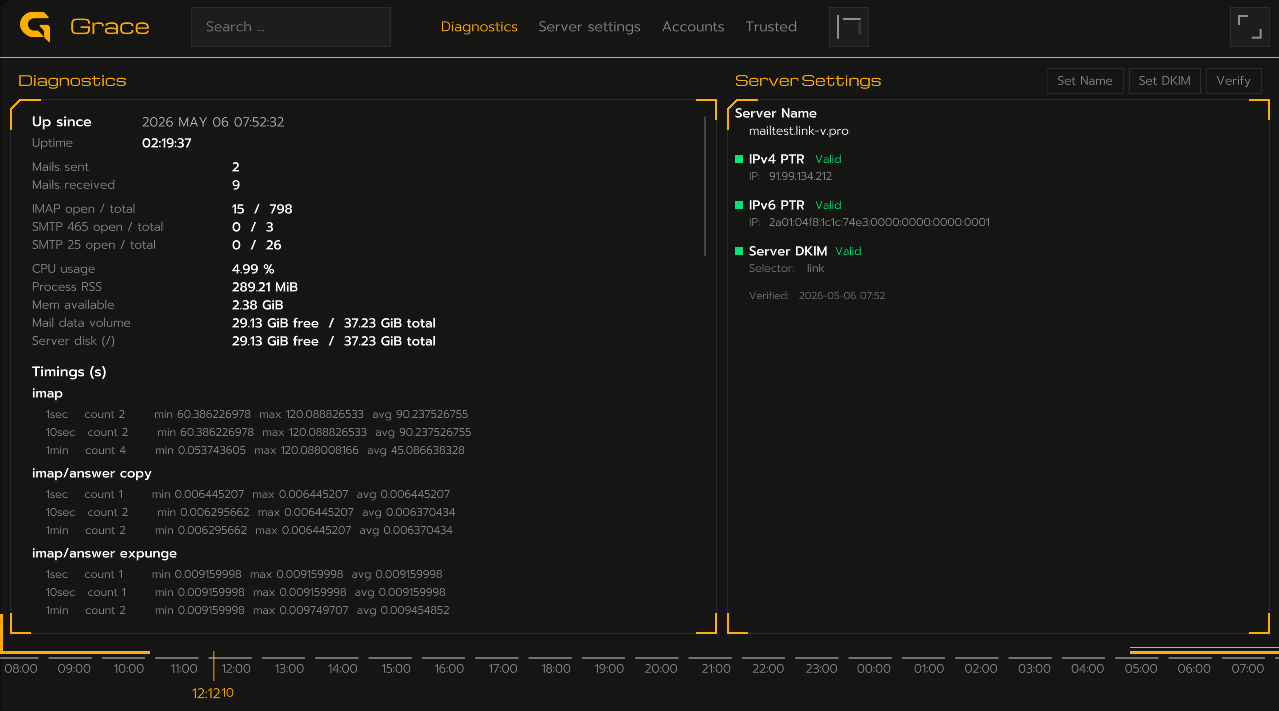
For example, this is how we see and verify everything is set up in Grace Mail.
Email migration has a reputation built on horror stories — lost mail, broken communication with clients. Those things happen when the process is not followed completely.
Done properly, the history stays until you say otherwise, the cutover is reversible, and the technical parts are smaller than they look.
If you have a reason to switch — privacy, security, or cost — your email is safe in the hands of a capable team.
Ready to move, or just want to understand what it would involve? Grace Mail Managed is a private dedicated email server we run for you, migration included. Or contact us if you want to talk through your situation first.